TOTK 1.0.0, 1.2.1 or 1.4.3
This source prepares startup shaders from your game data and waits for warm-up before the title screen by default. Version 1.1.2 is no longer a build target here.
MACNATIVEGAMES · SHADER DIAGNOSIS
Start by checking when the pause happens. A first-launch progress screen, a brief pause in a new scene and a game that stays slow need different fixes. Keep the cache, finish preparation, then compare the same scene a second time.
MacNativeGames source 821ce8c · November 2026 · TOTK on Mac. October build differences are listed below.
Progress or shader counts continue to change. Let the current preparation finish before changing graphics settings.
Compare the same camera turn and effects. Keep the shaders compiled on the first visit.
Check output settings and memory pressure after warm-up. Collect the repeated pause in a debug log.
Build stuck at “3/4 shaders” instead? That is shader preparation while making the app, before gameplay. Use the build-stage walkthrough and retain the first error if the build exits.
Record three things before applying a fix: the builder you used, the source revision and the game update printed during the build. An app name alone does not identify its renderer or settings.
This source prepares startup shaders from your game data and waits for warm-up before the title screen by default. Version 1.1.2 is no longer a build target here.
These snapshots also supported 1.1.2. The October 22 shortcut workflow differs from the October 30 settings panel. Do not add November-only options to an older build command.
Choose the matching source in the build wizard. If you use NX2Apple or nxnative, follow that engine’s settings and log locations; TOTK_* options from this page belong to MacNativeGames.
The build stage and the game’s launch progress are separate. A saved game is separate from both.
For a new build, choose the final output path in the build wizard. For example, set the output to /Applications/Tears of the Kingdom.app if that is where you plan to launch it. Keep that location for the comparison.
Let shader import and warm-up finish. Changing totals or progress means work is continuing. Do not repeatedly quit and restart while judging the first launch. There is no fixed countdown that fits every Mac, game version and cache state.
Read the failure rather than treating every pause as a graphics setting. A full disk can interrupt the seed import. A shader translation-chain mismatch after a runtime update needs a matching seed; use the runtime-update recovery steps. Keep the work folder so its game data can be reused.
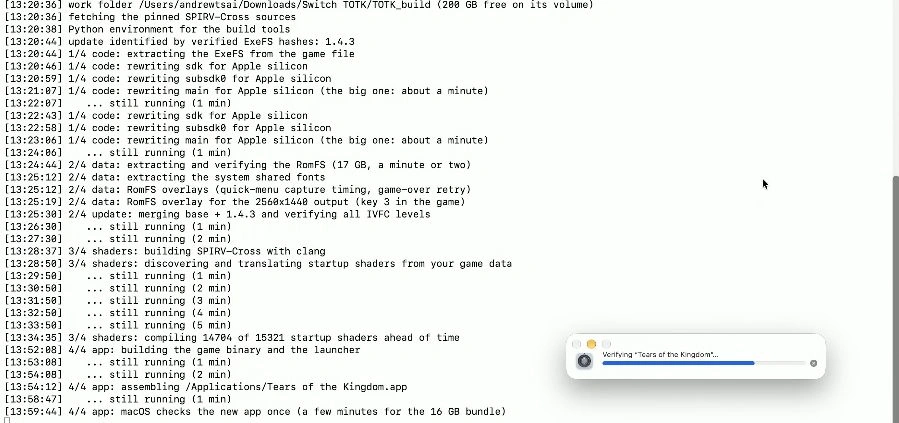
On a phone, swipe the image sideways or open it full size.
update identified … 1.4.33/4 shaders: compiling …4/4 app: assembling …Build stopped with an error? Copy the first error, stage and source revision into the matching recovery steps. To resume, use the same command and work folder.
For a Mac build with full Xcode, install its Metal toolchain before rebuilding. The packager can then include compiled Metal libraries with the app. This is different from repeatedly clearing the runtime cache.
xcodebuild -downloadComponent MetalToolchainRun the same build with the same input files and work folder after installing the toolchain. See where the shader and packaging stages appear.
Use a short route you can reproduce. A familiar save, one camera turn and the same visual effect are more useful than comparing a quiet room with a busy town.
Note the place, camera movement and action. Leave resolution, frame mode and mods unchanged.
Wait for preparation, then repeat the same route. Record whether the long pause returns at the same point.
Use the performance page’s frame-time explanation to distinguish a short hitch from a sustained frame-rate limit.
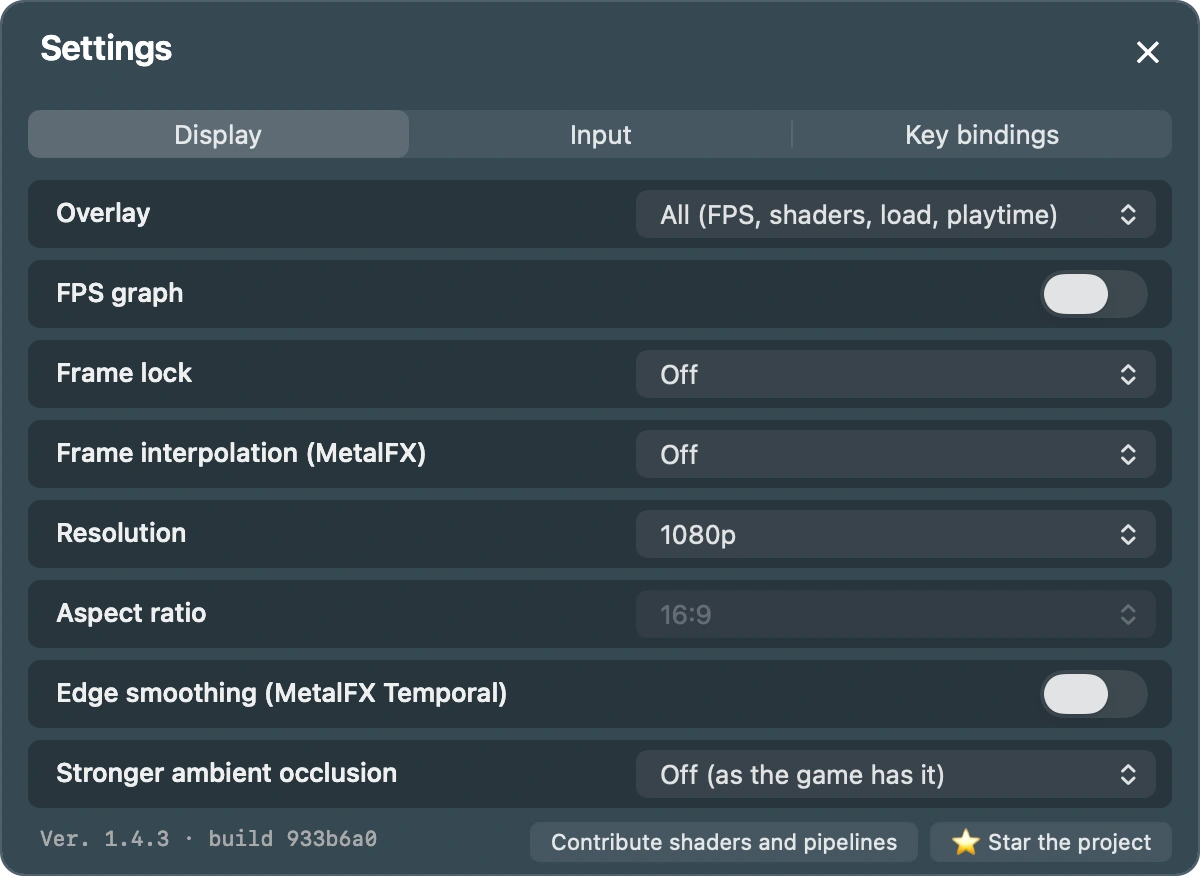
Find Frame lock and Resolution in these rows. Use the arrows or the menu to change a value, then close the panel with Esc or the × button.
English panel preview · source 933b6a0. Panel source ↗
Swipe sideways to read the controls, or open the full-size image.
The English panel preview above shows where to change the controls. Use the version map if your app uses the older shortcut-only controls. For M1 Air 8 GB and 1.4.3, see the specific repeated-stall case.
~/Library/Application Support/MacNativeGames/TOTK/shader-cache/rt-<chain>/. The launcher selects the translation-chain folder. Keep it between normal launches.pipelines/ data contains work for the GPU. The runtime uses its identity information to rebuild archives when the OS, GPU or translation chain changes.~/Library/Application Support/MacNativeGames/TOTK/profile/. This is your progress. Follow the save-backup steps before changing versions.On builds that depend on macOS’s compiled Metal cache, moving the app can lose cache reuse. Building directly at the final location avoids that extra change. The upstream investigation also found path-length effects in Metal’s cache lookup. Treat the final app location as part of your comparison.
Changing game versions does not require deleting your entire user-data folder. Current source filters warm-up to the selected game’s shader identity. Keep the old cache and saves while the app prepares the matching work.
Do not use a general system-cache cleaner as the first fix. It removes the warm state you are trying to measure and can affect other applications.
November builds write the game log only when debug logging is enabled. Quit the game before changing this option, then launch it normally and reproduce the short route once.
defaults write org.macnativegames.totk TOTK_DEBUG_LOG -bool YESRecord the game version, source revision, Mac chip and memory, macOS version, app location and Display settings. Note whether this was the first visit or a warmed-up repeat.
In Finder, press Shift + Command + G and paste the folder below. Copy totk.log to your report folder. The previous run is totk.previous.log; launching again rotates these files.
~/Library/Logs/MacNativeGames/Look for [shader-seed], preparation counts, compiler errors and the lines around the repeated pause. Some progress messages are written in Chinese by the runtime. Retain their original wording when reporting a failure.
defaults write org.macnativegames.totk TOTK_DEBUG_LOG -bool NOCopy first: a later launch with logging off removes the earlier game logs. See the no-log case if the folder has no current file. For Breath of the Wild, use its own org.macnativegames.botw preference and botw.log.
No. Keep it for a normal update. Use a matching runtime and seed; the current runtime separates translation chains and checks the pipeline archive’s identity. Follow an exact error’s recovery instructions before removing anything.
A cap can make frame delivery steadier, but it does not prepare a missing shader. Finish warm-up, repeat the scene, then use Frame lock or interpolation for the warmed-up baseline.
NX2Apple uses a different engine and cache layout. For a game that exits while entering a larger scene, first check the signing guide’s memory-entitlement steps. Use that app’s log.txt, not the MacNativeGames Mac log path.
Rebuild with the right tools →Set a steady frame mode →Compare a recorded run →
Technical reference: GitHub shader preparation and cache behavior · Mac launcher and log behavior. Source snapshot: 821ce8c, 4 November 2026.